
Companion
The asambl Companion is the iPhone app that gives you your week on the go, mirroring the plan you build on the desktop.
The Companion is the asambl mobile app for iPhone. It is a native iOS app that loads your asambl calendar in an in-app browser view, and the same experience is reachable at calendar.asambl.app if you want to use it from a phone browser. It gives you your week on the go and mirrors the plan you build on the desktop, so the agenda you see on your phone matches the one you assembled at your machine. It needs your desktop app running to reach your files, connecting through a secure relay so your phone and desktop stay in step.
The Companion is an iPhone app; an Android version is not available yet. It is part of asambl and available to everyone in the beta, at no additional cost.
How it is organised
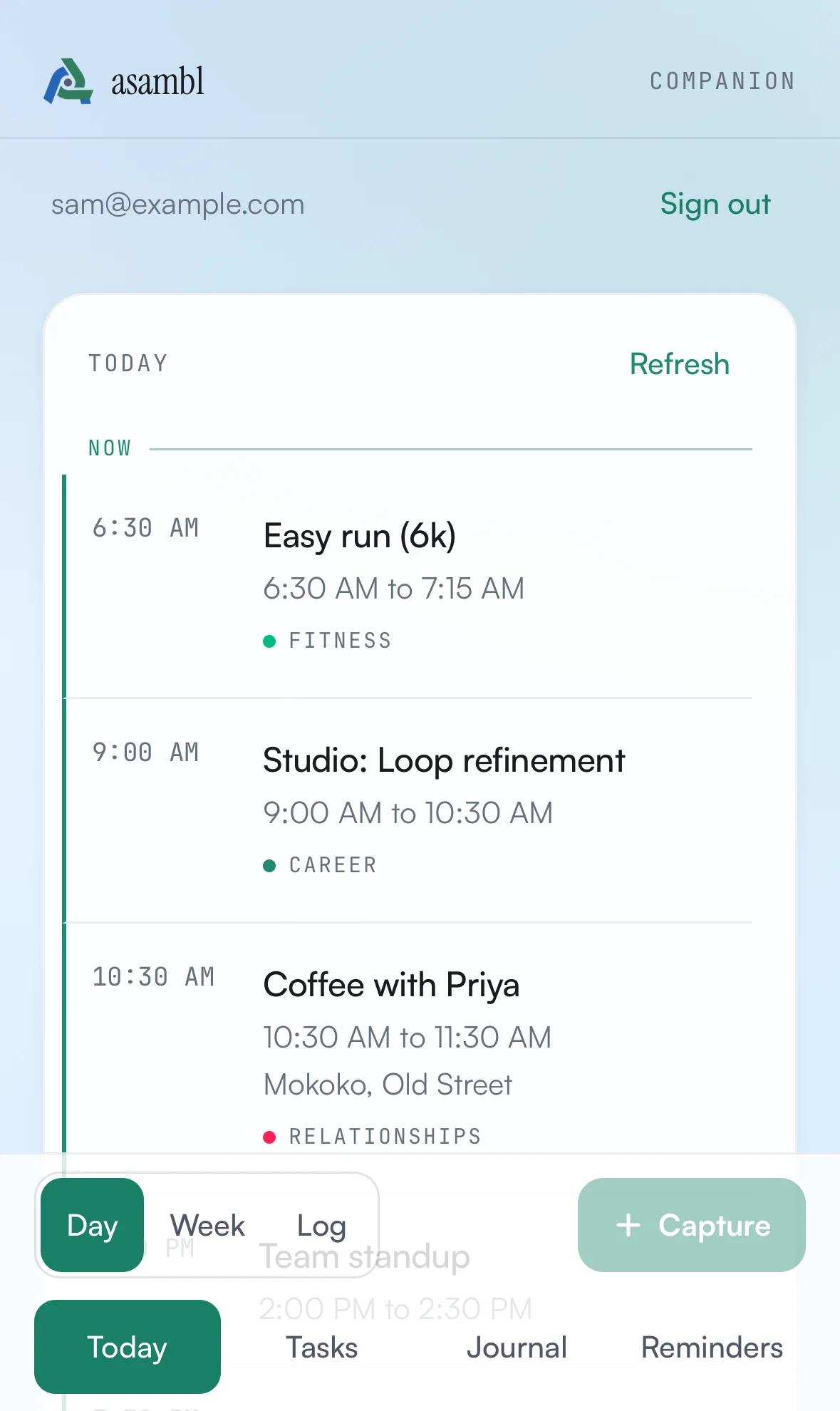
A bar along the bottom moves between four sections: Today, Tasks, Journal, and Reminders.
Today is where you land, and it carries its own toggle between three views:
- Day, today's agenda.
- Week, the week at a glance.
- Log, for recording what you did.
Today
Your day and week at a glance. Items are grouped by day, and each one carries a life-area colour accent so you can read your week by area without opening anything. It is the fast answer to "what is on today" when you do not have your desktop in front of you.
The Capture button sits beside the view toggle, so getting something out of your head is one tap from your agenda.
Log
The Log view holds three modes.
Workout is a session logger built for the gym. Record each set with reps, load, effort, and how your energy felt.
Food is a fast meal log for when you are out. Scan a product barcode and asambl looks it up so you do not have to type the details, or add a meal by hand.
Weight records a weigh-in.
All three flow back to Health & Wellness on your desktop, where the full meal table, macro estimates, daily tally, and training history live.
Tasks, Journal and Reminders
The other three sections mirror the desktop side rail.
Tasks shows your list grouped by life area, with ticking and quick-add.
Journal is a dated composer with a mood picker, so an entry written on the train is the same entry you would have written at your desk.
Reminders lists the coming two weeks, and you can mark one done or snooze it. Reminders still fire on the desktop; this is for clearing them, not scheduling them.
Anything you change here queues end-to-end encrypted and applies when your desktop is next awake.
Capture
Capture is for the thought that lands while you are away from your desk, before it evaporates. From the capture sheet you can add:
- A Note: a thought, a fragment, something to keep.
- A Todo: a task to act on later.
- A Reminder: something you want surfaced at the right moment.
- A Voice note: speak it when typing is not practical.
- A Barcode: scan a product to log it against a meal.
You can also send things to asambl from other apps. From Safari or Notes, use the iOS share sheet to hand a link or a snippet straight to the Companion, and it lands with your other captures.
Captures are end-to-end encrypted: your phone seals each one to your desktop before it leaves the device, and the relay that carries it only ever holds the encrypted version, never the plain text. If you are offline, captures queue on the phone and send themselves once you reconnect, so nothing is lost.
When you are next at your desktop, the notes, todos, and reminders you captured arrive in your Inbox to triage. They are separate from the desktop rail's own Tasks and Reminders, which you author directly.
How it stays in sync
The Companion is deliberately read-heavy for your week and write-light for what you capture. Your desktop is the source of truth: it holds your files and builds your plan. asambl-tagged events you create on the desktop appear in the Companion agenda, filtered by life area, so you are always looking at the same week you assembled at your machine.
What you add on the phone, your captures, workouts, meals, and the changes you make in Tasks, Journal and Reminders, travels back to the desktop over the encrypted relay while your desktop is running. The phone is a fast window onto your plan and an inbox for the things you catch on the go, not a separate copy you maintain.
Ask asambl
A conversational assistant built into the app that answers questions about your week, habits, goals, and life-area data, and can act on your answer once you approve it.
Settings
Every section of Settings, the screens that ship hidden, the keyboard shortcuts, and how asambl handles your data.