
Themes
Ten themes and skins that change how asambl looks, from a quiet light default to a full monospace terminal.
asambl ships ten looks. Some are straightforward light and dark palettes. Others are full skins that change the typeface, the corner radius, and the texture of every surface, so the app reads as a different object rather than the same one recoloured.
Open Settings, go to General, and pick from the swatch grid. Each swatch previews its own background, surface, accent, and text colour, and skins with their own typeface render their name in it. The change applies immediately and sticks across restarts.
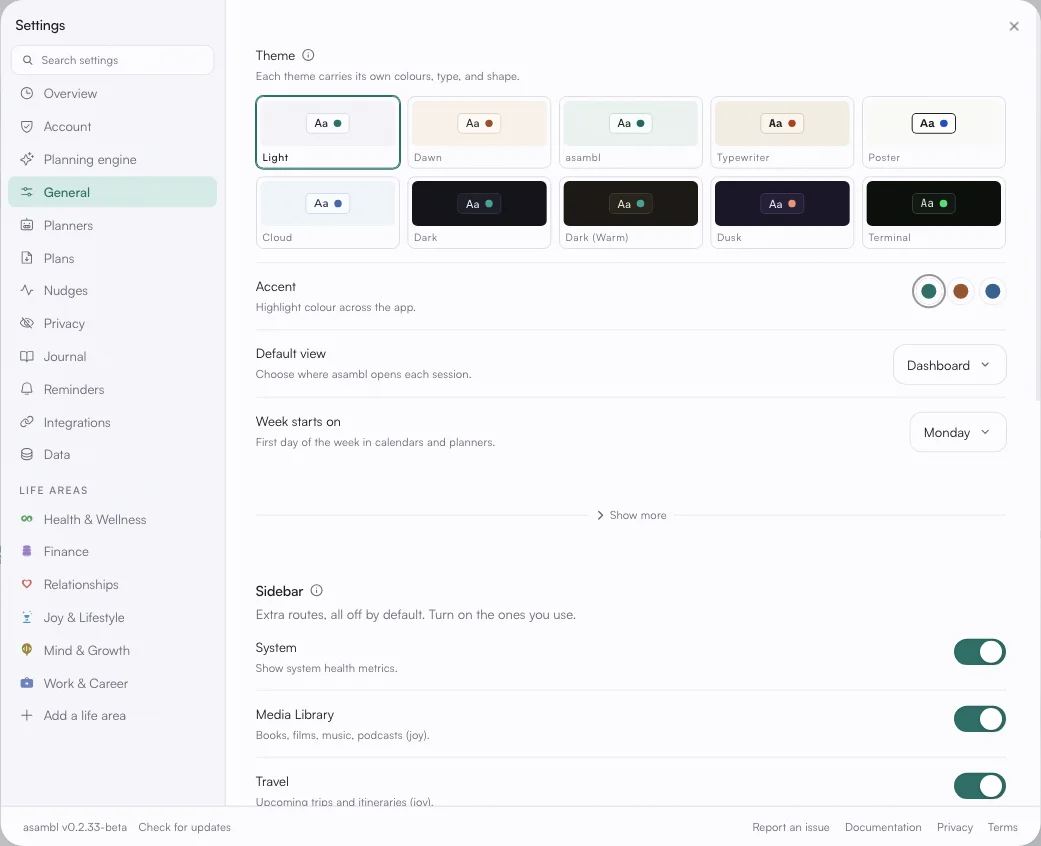
The ten
Light is the default. A cool neutral grey with a teal accent, and the one to use if you want asambl to stay out of the way.
Dawn is its warm counterpart: bone and clay with a burnt-orange accent.
asambl carries the brand tint, a soft green cast across every surface.
Typewriter sets the whole app in iA Writer Quattro on warm paper, with a brick-red accent. Closest thing to writing on a page.
Poster is high-contrast editorial: near-white ground, hard black borders, Archivo, and a strong blue accent.
Cloud is soft and blue-grey, set in Nunito Sans. The gentlest of the light set.
Dark is the standard dark palette, cool grey with the teal accent.
Dark (Warm) is the same idea over brown-black rather than blue-black, easier on the eyes in a warm room.
Dusk is Dawn's opposite number: deep violet with a coral accent.
Terminal is near-black green-tinted, set entirely in JetBrains Mono. The most opinionated of the set.
Accent colour
The accent is separate from the theme. Each theme carries its own accent palette, and you can pick a different one within it from the same General section. Life-area colours are not affected: Health & Wellness stays green, Finance stays violet, and so on across every theme, because those colours are how you read your calendar at a glance.
What a theme does not change
A theme is presentation only. It does not change your files, your plans, or how the planner behaves. Switching between them is free, and nothing you have captured depends on which one is active.